For safety, inspection and maintenance teams
Dictate the inspection.Get the report.
When the visit's done, you send a voice note on Telegram. ReportAI fills in your Word template with it: what you saw, the issues, who fixes them and by when. Once you approve it, it goes to the right people.
Installed on your own server: the recordings and reports stay with you.
SITE SAFETY INSPECTION
Maple Ridge Apartments · Riverside
Date:{{ date }}2026-10-01Stage:{{ stage }}Structure
Contractors on site
- {{ contractors[0] }}Harbor Build (general contractor)
- {{ contractors[1] }}Summit Concrete (formwork)
- {{ contractors[2] }}Iron Line Rebar (rebar)
Hands-free
Dictate when you finish the visit. No forms on your phone, no typing it up at night.
Your template, as it is
Your Word file, your logo, your sections. No template yet? Start with ours.
Nothing goes out unapproved
The draft arrives in the chat. Approve it, or correct it with a reply.
On your server
Your data never goes through a shared service. The AI is the provider you choose.
This isn't a mockup.
A site inspection, dictated and run through the real system: transcription, extraction and the filled-in template. Nothing was touched up afterwards, not even the transcript's typos. Press play.
Transcript
The transcript appears here, in step with the audio.
Extracted fields
- Site: Maple Ridge Apartments, Phase 2, 140 Oak Street, Riverside
- Date: 2026-10-01
- Contractors on site: Harbor Build (General Contractor) +3
- Issues: 3 · Edge protection missing on the north side… — Summit Concrete — Immediate
- Work stopped: Yes
- Next visit: 2026-10-08
Generated document
1 page · 'Site safety inspection' template
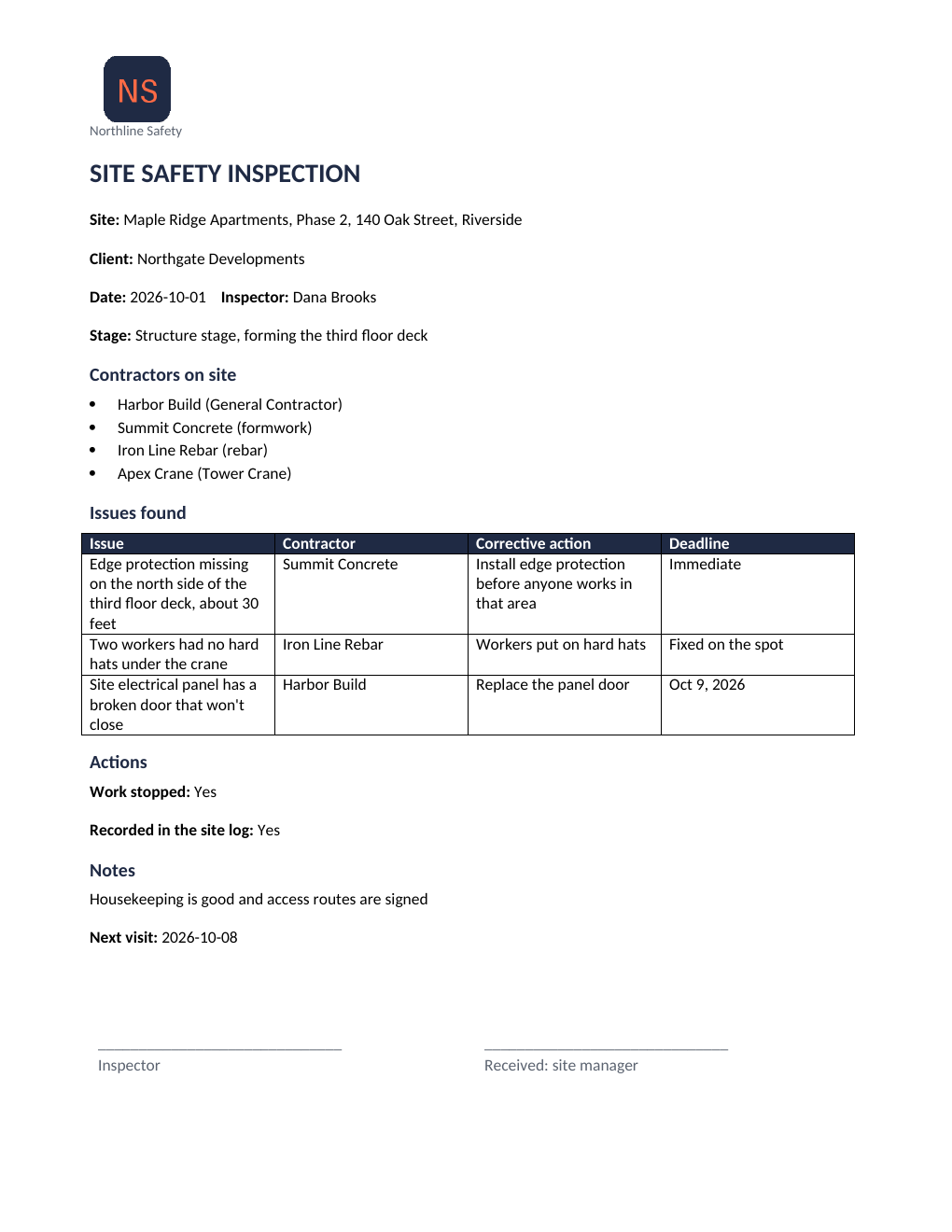
The voice is synthetic, and the site, companies and people are fictional. Everything else is the system's real output, which cost under 3 cents of AI.
Download the PDFFrom voice note to delivered report.
Five steps. You do two: dictate and approve.
- You
You dictate the inspection
When you finish the visit, in the car or wherever you are. On Telegram, like any voice note, with photos if you like.
voice_note.ogg - ReportAI
It's transcribed
In seconds, in English or Spanish, with the speech service you choose.
transcript.txt - ReportAI
The fields are filled in
Your template's sections: place, issues with who fixes them and by when, notes. If something required is missing, it asks.
fields.json - You
You approve it
Review the draft in the chat and confirm, or correct it with a voice or text reply.
approved ✓ - ReportAI
It's delivered
Your template as a PDF, emailed to the client, the person in charge or whoever you set up, and kept in the history.
inspection_report.pdf
Built for people in the field, not in the office.
Start with the safety inspection. Any document with fixed sections can be dictated the same way.
Safety visits and inspections
Issues with who's responsible, corrective action and deadline, work stopped and notes. Comes as a starter template.
fields · issues · work_stopped · notes · next_visit
Incidents and accidents
What happened, where, how serious and what has been done already. Dictated on the spot, reviewed calmly. Also a starter template.
fields · date · place · description · severity · actions
Whatever you fill in by hand today
Maintenance work orders (also a starter template), checklists, minutes. If you already have your Word file, the assistant proposes the fields.
fields · whatever your template has
No more writing reports at night.
Today an inspection means notes in a notebook and photos on your phone, typed up into Word at the end of the day. With ReportAI it's done before you're back at the car.
The only new thing in your day: a one-minute voice note.
| Today | With ReportAI |
|---|---|
| Notes in a notebook and loose photos | One voice note as you leave, photos in the same chat |
| Typing it up in Word at night | The draft arrives in the chat in a couple of minutes |
| Forgetting a deadline or who owns an action | If something required is missing, the bot asks |
| Forwarding the PDF to the client and everyone responsible | Sent to the right people for each report type |
| Searching your inbox for what you saw last month | Searchable history, with the audio and transcript |
SITE SAFETY INSPECTION
Date:{{ fecha }}October 1, 2026
Site:{{ obra }}Maple Ridge Apartments, Riverside
Contractors on site
{% for e in empresas_presentes %}{{ e }}{% endfor %}Harbor Build, Summit Concrete, Iron Line Rebar, Apex Crane
Issues found
{{ deficiencias[0].deficiencia }}Edge protection missing on the north side of the third-floor deck · Summit Concrete · Immediate
Your template, not ours.
Upload the Word file you already use, with your logo and layout. The assistant reads it and proposes its fields and where each one goes; you correct it, preview it as a PDF with sample data and switch it on. No generic PDF with your logo slapped on top.
No template yet? Start with the site safety inspection one, already with your logo, and adjust it in Word.
It asks for what's missing. Nothing goes out unapproved.
Every report reaches the chat first as a draft. If something required is missing, like a deadline, the bot asks you. If something is off, you correct it with a reply and it's generated again.
It runs on Telegram: your team installs it once and talks to your company's bot like any other contact. Approvers can also review, correct and approve from the panel.
We leave it running on your server.
We install and maintain it; the data and the keys are yours. This is how we start:
You send us your template
The Word file of your inspection report and who should receive it. No template? We start from ours.
We install it on your server
One of yours, or a VPS in your name. We set up the AI with your account, the Telegram bot and your template.
You dictate the first inspection
And the report reaches the right people. We fine-tune the template with real inspections, then keep it up to date.
What you see in your panel
- Templates and assistant
- Who can send reports
- Recipients per report type
- History with audio and transcript
- Team and permissions
You pay for the service, not the software.
ReportAI's code is public and you can install it for free. If you'd rather not touch a server, we install and maintain it for you.
You install it
For companies with someone technical.
Free
- One-command install on your server
- Every feature and starter template
- Published updates and security notices
- Questions and bugs on GitHub, no guaranteed response
- Recommended
We install and maintain it
To use it without touching a server.
One-off fee + monthly fee
- Installed on your server or a VPS in your name
- Your template set up and tested with real inspections
- AI and Telegram bot set up with your accounts
- Updates and support by email or Telegram
Founding pilot
For the first companies.
Founder pricing
2 of 5 places left- Installation and maintenance as in the plan before
- In exchange for your feedback every week of the pilot
- And for telling your story if it works for you
What you pay separately, straight to each provider
- Server: about €9 a month plus VAT if you don't have one.
- AI: cents per report, on your account with the provider you choose.
- Telegram: free.
You get a fixed price once we've seen your template.
Questions we get before starting.
Do I need to know about servers?
No. If we install it, we leave it running on a server of yours or a VPS in your name. If someone at your company is technical, it installs with a single command following the guide.
Does my team have to install anything?
Telegram, once. You send each person an invite link from the panel; opening it is all they need to start dictating. WhatsApp is in testing.
What if it gets something wrong?
The draft reaches the chat before it's sent, and nothing goes out without your approval. If something required is missing, the bot asks; if something's wrong, you correct it with a reply. Every field is validated: a date has to be a date.
Where is the data?
On your server: recordings, photos, reports and templates. To transcribe and fill in, the text goes through the AI provider you choose, with your own keys, and the messages through Telegram. Keys are stored encrypted.
Who writes the report?
An AI model drafts it from what you dictate and doesn't fill in what you didn't say: it asks for what's missing. The content remains the responsibility of whoever approves it.
Which languages does it work in?
English and Spanish. The example on this page exists in both.
Does it work for other documents?
Yes. It comes with starter templates for safety inspections, work orders, site visit reports and incident reports, and you can upload any Word file with fixed sections.
How much does it cost?
Installing it yourself is free. If we install and maintain it, it's a one-off fee plus a monthly fee, fixed once we've seen your template. Separately, you pay for your server (about €9 a month) and the AI (cents per report).
Dictate the inspection. Get the report.
Send us the template you use today and we'll show you your own report, filled in from a voice note.
or write to adrian@vazquezdev.pro